How to Power Claude GitHub Actions with Z.ai: A Cost-Effective Guide
Introduction
If you’re a fan of Claude Code like me, you’ve probably considered enabling the Claude App on GitHub for automated code reviews and issue handling. However, the cost can be prohibitive, especially for personal projects and small teams.
Enter Z.ai - a cost-effective alternative that offers Claude-compatible models at significantly lower prices. Z.ai has made their models fully compatible with Claude Code, making it an excellent choice for developers who want AI-powered GitHub automation without breaking the bank.
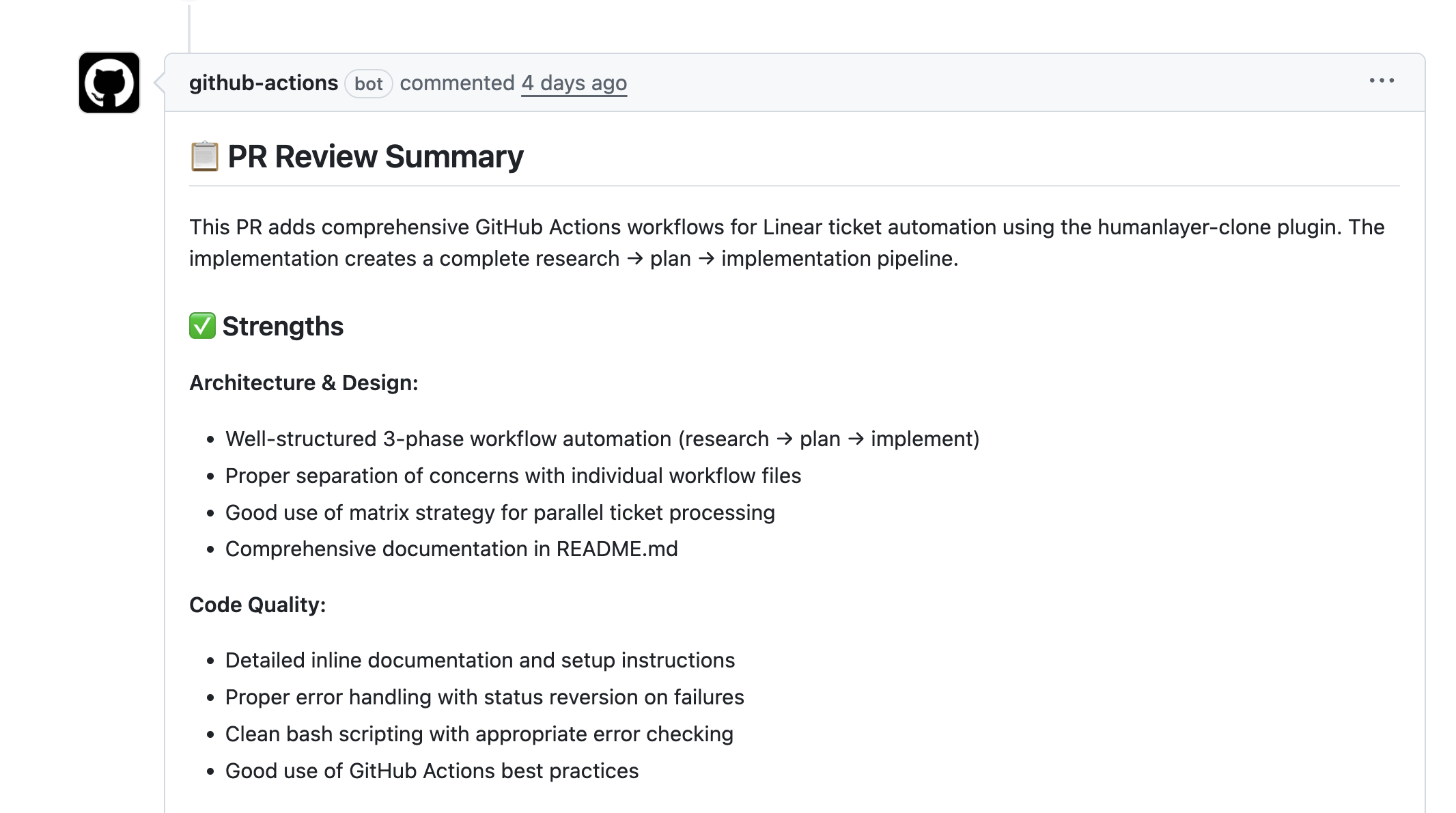
In this tutorial, I’ll show you exactly how to set up Claude Code GitHub Actions powered by Z.ai for automated code reviews, issue management, and more.
Prerequisites
Before you begin, you’ll need:
- A GitHub repository
- A Z.ai account with API access
- Basic familiarity with GitHub Actions
- Claude Code CLI installed (we’ll cover this in the setup)
Step-by-Step Setup Guide
Step 1: Configure Z.ai with Claude Code Locally
First, follow the official Z.ai setup guide to configure Z.ai with Claude Code.
I highly recommend testing the setup locally before deploying to GitHub Actions to ensure everything works correctly.
Pro Tip: If you want to maintain separate Claude Code configurations (one for Z.ai and one for standard Claude), you can create an alias in your .bashrc or .zshrc file:
alias claude-dev='CLAUDE_CONFIG_DIR=~/.claude-zai claude'
This allows you to switch between different API configurations seamlessly after setting up separate Claude config directories with different settings.json files.
Step 2: Configure GitHub Secrets
Before setting up the GitHub Actions, you’ll need to add your Z.ai API key to your repository secrets:
- Go to your repository Settings → Secrets and variables → Actions
- Click New repository secret
- Name it
Z_AI_API_KEYand paste your Z.ai API key - Save the secret
Step 3: Set Up GitHub Action for Issue Management
This GitHub Action enables Claude to respond to issues and pull request comments. It provides the same functionality as the official Claude Code GitHub Action but uses Z.ai as the backend.
name: Claude Code

on:
  issue_comment:
    types: [created]
  pull_request_review_comment:
    types: [created]
  issues:
    types: [opened, assigned]
  pull_request_review:
    types: [submitted]

jobs:
  claude:
    if: |
      (github.event_name == 'issue_comment' && contains(github.event.comment.body, '@claude')) ||
      (github.event_name == 'pull_request_review_comment' && contains(github.event.comment.body, '@claude')) ||
      (github.event_name == 'pull_request_review' && contains(github.event.review.body, '@claude')) ||
      (github.event_name == 'issues' && github.event.action == 'assigned') ||
      (github.event_name == 'issues' && github.event.action == 'opened' && (contains(github.event.issue.body, '@claude') || contains(github.event.issue.title, '@claude')))
    runs-on: ubuntu-latest
    permissions:
      contents: write
      pull-requests: write
      issues: write
      id-token: write
      actions: read # Required for Claude to read CI results on PRs
    steps:
      - name: Checkout repository
        uses: actions/checkout@v4
        with:
          fetch-depth: 0

      - name: Setup Node.js
        uses: actions/setup-node@v4
        with:
          node-version: '20'

      - name: Install Claude Code CLI
        run: npm install -g @anthropic-ai/claude-code

      - name: Setup Claude Code
        env:
          Z_AI_API_KEY: $
        run: |
          mkdir -p ~/.claude
          cat > ~/.claude/settings.json << EOF
          {
            "env": {
              "ANTHROPIC_AUTH_TOKEN": "$Z_AI_API_KEY",
              "ANTHROPIC_BASE_URL": "https://api.z.ai/api/anthropic",
              "API_TIMEOUT_MS": "3000000",
              "CLAUDE_CODE_DISABLE_NONESSENTIAL_TRAFFIC": 1
            }
          }
          EOF

      - name: Set context variables
        id: context
        run: |
          # Determine context type
          if [ "$" == "issue_comment" ]; then
            echo "CONTEXT_TYPE=pr_comment" >> $GITHUB_OUTPUT
            echo "ISSUE_NUMBER=$" >> $GITHUB_OUTPUT
          elif [ "$" == "pull_request_review_comment" ]; then
            echo "CONTEXT_TYPE=pr_review_comment" >> $GITHUB_OUTPUT
            echo "ISSUE_NUMBER=$" >> $GITHUB_OUTPUT
          elif [ "$" == "pull_request_review" ]; then
            echo "CONTEXT_TYPE=pr_review" >> $GITHUB_OUTPUT
            echo "ISSUE_NUMBER=$" >> $GITHUB_OUTPUT
          elif [ "$" == "issues" ]; then
            echo "CONTEXT_TYPE=issue" >> $GITHUB_OUTPUT
            echo "ISSUE_NUMBER=$" >> $GITHUB_OUTPUT
          fi

      - name: Extract prompt from GitHub event
        id: extract-prompt
        run: |
          if [ "$" == "issue_comment" ] || [ "$" == "pull_request_review_comment" ]; then
            echo "PROMPT<<EOF" >> $GITHUB_OUTPUT
            echo "$" >> $GITHUB_OUTPUT
            echo "EOF" >> $GITHUB_OUTPUT
          elif [ "$" == "issues" ]; then
            if [ "$" == "assigned" ]; then
              echo "PROMPT<<EOF" >> $GITHUB_OUTPUT
              echo "This issue has been assigned to you. Please review and implement the requested changes."
              echo ""
              echo "Issue: $"
              echo ""
              echo "$"
              echo "EOF" >> $GITHUB_OUTPUT
            else
              echo "PROMPT<<EOF" >> $GITHUB_OUTPUT
              echo "$" >> $GITHUB_OUTPUT
              echo "EOF" >> $GITHUB_OUTPUT
            fi
          elif [ "$" == "pull_request_review" ]; then
            echo "PROMPT<<EOF" >> $GITHUB_OUTPUT
            echo "$" >> $GITHUB_OUTPUT
            echo "EOF" >> $GITHUB_OUTPUT
          fi

      - name: Run Claude Code
        id: claude
        env:
          GH_TOKEN: $
          REPO: $
          ISSUE_NUMBER: $
          CONTEXT_TYPE: $
        run: |
          # Add context to prompt
          FULL_PROMPT=$(cat <<EOF
          Repository: $REPO
          Context: $CONTEXT_TYPE
          Issue/PR #: $ISSUE_NUMBER

          $

          ---
          Instructions:
          - You can view PR/issue details using: gh pr view $ISSUE_NUMBER or gh issue view $ISSUE_NUMBER
          - Post your response using: gh issue comment $ISSUE_NUMBER --body "your response" (works for both issues and PRs)
          - You can commit changes, create branches, and edit files as needed
          - For code changes, commit with clear messages and post a comment summarizing what you did
          EOF
          )

          claude -p "$FULL_PROMPT" \
            --allowedTools "Bash(gh pr view:*),Bash(gh pr diff:*),Bash(gh pr list:*),Bash(gh issue view:*),Bash(gh issue comment:*),Bash(gh issue list:*),Bash(gh api:*),Bash(git checkout:*),Bash(git commit:*),Bash(git push:*),Bash(git branch:*),Bash(git add:*),Bash(git status:*),Bash(git diff:*),Bash(git log:*)" \
            --permission-mode acceptEdits
Create a file named .github/workflows/claude-code.yml in your repository and paste the above configuration.
How it works:
- Triggers when someone mentions
@claudein an issue or PR comment - Automatically responds when an issue is assigned or opened with
@claudein the title/body - Claude can view PR/issue details, make commits, and respond with helpful feedback
Step 4: Set Up Automated PR Code Review
This GitHub Action provides automated code review for every pull request. It’s perfect for catching bugs, security issues, and code quality problems early in the development cycle.
name: Claude Code Review

on:
  pull_request:
    types: [opened, synchronize]
    # Optional: Only run on specific file changes
    # paths:
    #   - "src/**/*.ts"
    #   - "src/**/*.tsx"
    #   - "src/**/*.js"
    #   - "src/**/*.jsx"

jobs:
  claude-review:
    # Optional: Filter by PR author
    # if: |
    #   github.event.pull_request.user.login == 'external-contributor' ||
    #   github.event.pull_request.user.login == 'new-developer' ||
    #   github.event.pull_request.author_association == 'FIRST_TIME_CONTRIBUTOR'

    runs-on: ubuntu-latest
    permissions:
      contents: read
      pull-requests: write
      id-token: write

    steps:
      - name: Checkout repository
        uses: actions/checkout@v4
        with:
          fetch-depth: 1

      - name: Setup Node.js
        uses: actions/setup-node@v4
        with:
          node-version: '20'

      - name: Install Claude Code CLI
        run: npm install -g @anthropic-ai/claude-code

      - name: Setup Claude Code
        env:
          Z_AI_API_KEY: $
        run: |
          mkdir -p ~/.claude
          cat > ~/.claude/settings.json << EOF
          {
            "env": {
              "ANTHROPIC_AUTH_TOKEN": "$Z_AI_API_KEY",
              "ANTHROPIC_BASE_URL": "https://api.z.ai/api/anthropic",
              "API_TIMEOUT_MS": "3000000",
              "CLAUDE_CODE_DISABLE_NONESSENTIAL_TRAFFIC": 1
            }
          }
          EOF

      - name: Run Claude Code Review
        id: claude-review
        env:
          GH_TOKEN: $
        run: |
          PROMPT=$(cat <<EOF
          REPO: $
          PR NUMBER: $

          Please review this pull request and provide feedback on:
          - Code quality and best practices
          - Potential bugs or issues
          - Performance considerations
          - Security concerns
          - Test coverage
          - Architecture and design patterns

          Use the repository's CLAUDE.md for guidance on style and conventions. Be constructive and helpful in your feedback.

          IMPORTANT: Post your review in TWO ways:

          1. **General Summary Comment**: Use \`gh pr comment $ --body "..."\` to post an overall review summary with key findings and recommendations.

          2. **Inline Comments** (for specific issues): Use \`gh api\` to post line-specific comments on code that needs attention:
             \`\`\`bash
             gh api --method POST /repos/$/pulls/$/comments \\
               -f body="Your specific feedback here" \\
               -f commit_id="\$(gh api /repos/$/pulls/$ --jq '.head.sha')" \\
               -f path="path/to/file.py" \\
               -F line=10 \\
               -f side="RIGHT"
             \`\`\`

          For large PRs, focus on the most critical issues and important files. Skip generated files, lock files, and vendor directories.
          EOF
          )
          claude -p "$PROMPT" \
            --allowedTools "Bash(gh pr view:*),Bash(gh pr diff:*),Bash(gh pr comment:*),Bash(gh pr list:*),Bash(gh api:*)" \
            --permission-mode acceptEdits
Create a file named .github/workflows/claude-code-review.yml in your repository and paste the above configuration.
Key features of this workflow:
- Automatically reviews every new pull request
- Provides both general summary comments and inline code feedback
- Focuses on code quality, security, performance, and best practices
- Can be customized to run only on specific file types or for specific contributors
Benefits and Use Cases
Cost Savings
By using Z.ai instead of direct Claude API calls, you can significantly reduce costs while maintaining high-quality AI code reviews. This makes it viable for:
- Personal projects and side hustles
- Open source repositories
- Small teams with limited budgets
- Educational projects
Automation Capabilities
With this setup, you get:
- Automated Code Reviews: Every PR gets reviewed for bugs, security issues, and best practices
- Issue Triage: Claude can help categorize and respond to issues automatically
- Code Improvements: Claude can suggest and even implement fixes directly
- Documentation: Claude can help update documentation based on code changes
Troubleshooting Tips
If you encounter issues:
- Action not triggering: Verify your GitHub Action permissions in repository settings
- API errors: Check that your
Z_AI_API_KEYsecret is correctly set - Timeout issues: The configuration includes a 3000-second timeout, but you may need to adjust for larger repositories
- Local testing: Always test your configuration locally with
claude-devbefore deploying to GitHub
Conclusion
Integrating Z.ai with Claude Code GitHub Actions opens up powerful automation possibilities without the high costs typically associated with AI-powered development tools. Whether you’re managing personal projects or working with a small team, this setup provides enterprise-level code review capabilities at a fraction of the cost.
The combination of Claude Code’s intelligent analysis and Z.ai’s cost-effective API makes it easier than ever to maintain code quality, catch bugs early, and streamline your development workflow.
Give it a try and experience the magic of AI-powered GitHub automation without breaking the bank! If you implement this in your projects, I’d love to hear about your experience.